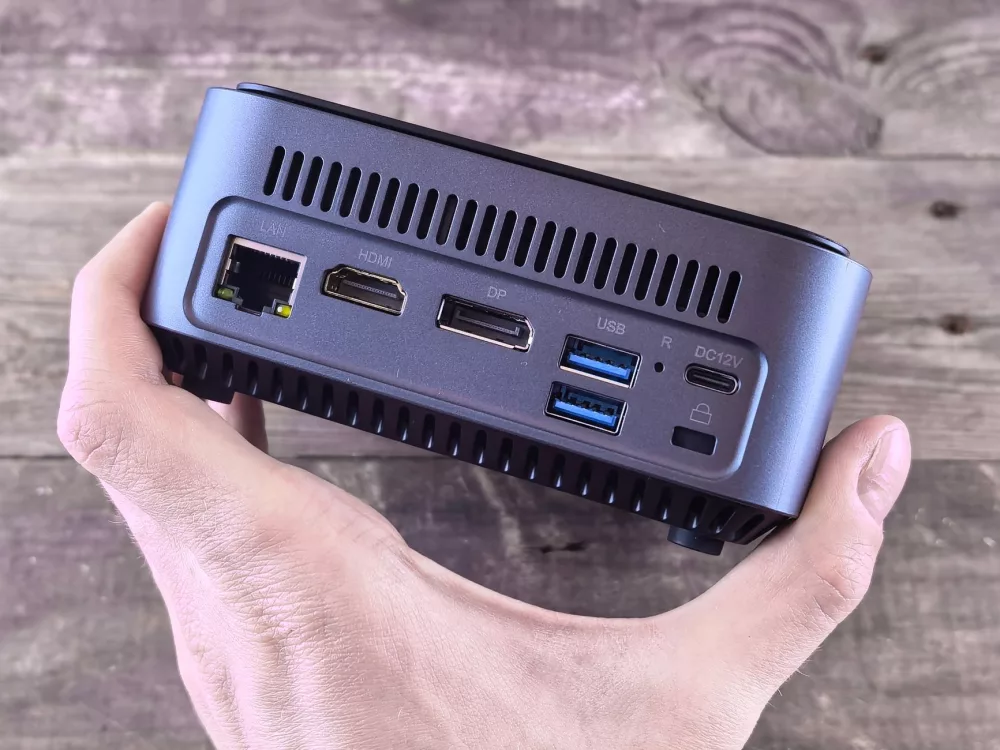
When we talk about personal computing these days, it's easy for our minds to jump straight to massive gaming rigs or sleek, minimalist all-in-one desktops. But what if I told you there's a rapidly growing segment that offers impressive power, incredible space-saving design, and often, surprising affordability? I'm talking about mini PCs, and among the many brands making waves, Geekom has certainly carved out a significant niche for itself. Honestly, I've been quite impressed with what they're doing.
What's the Big Deal with Mini PCs, Anyway?
Before we get too specific about Geekom, let's just chat for a moment about why mini PCs are even a thing. For the longest time, if you wanted decent performance, you needed a desktop tower that took up significant real estate under your desk or beside your monitor. That's just how it was. But technology evolves, right? Processors became more efficient, components shrunk, and cooling solutions got smarter.
Suddenly, we didn't need a huge box for everyday tasks or even a fair bit of demanding work. Mini PCs offer an alternative that's:
- Space-saving: They can literally fit in the palm of your hand, or easily tuck behind a monitor.
- Energy-efficient: Less power draw means lower electricity bills, which is always a plus in my book.
- Quiet: Often, with smaller fans or even fanless designs, they generate less noise than a traditional desktop.
- Portable: You can easily move them between rooms or even take them with you if you need to.
- Aesthetically pleasing: Many have really sleek, modern designs that don't look out of place in any setting.
For me, the appeal is clear: getting substantial computing power without the bulk. Geekom has really leaned into this concept, offering a range of models tailored to different user needs, which I find pretty smart.
Geekom's Approach: Variety is the Spice of Life
Geekom doesn't just make one type of mini PC; they've got a whole lineup, each designed with specific users in mind. This is something I really appreciate because it means there's likely a Geekom mini PC for almost anyone.
Their Core Series Often Includes:
- The Mini IT Series: These are typically your all-rounders, sporting powerful Intel Core i5 or i7 processors, suitable for most office tasks, multimedia consumption, and even some light gaming. They're usually quite compact but still offer decent connectivity.
- The Mini Air Series: As the name suggests, these are often thinner and lighter, sometimes optimized for lower power consumption or fanless operation for absolute silence. Think digital signage, basic office work, or a dedicated media center.
- The Mini AS Series (often with AMD processors): For those who prefer AMD's Ryzen architecture, Geekom offers models that leverage the excellent multi-core performance and integrated graphics that Ryzen chips are known for. These can be fantastic for productivity and light to moderate gaming.
- Specialized Models: Occasionally, they'll release models with specific features, like extra robust cooling or unique port configurations for industrial applications or specific home setups.
What I've observed is that Geekom doesn't skimp on core components. They're usually packing in modern processors, ample RAM, and fast SSD storage. It's not just about the tiny footprint; it's about delivering a genuine computing experience.
Under the Hood: What Makes a Geekom Tick?
Let's get into some of the specifics that I typically look for in a mini PC, and where Geekom often shines.
Processors and Performance
You'll find a mix of Intel and AMD CPUs across Geekom's range. We're talking about everything from efficient Intel N-series processors for basic tasks up to powerful Intel Core i7 or AMD Ryzen 7 chips that can handle pretty heavy workloads. If you're just browsing the web, checking emails, or doing word processing, even their entry-level options are more than sufficient. For tasks like 4K video playback, photo editing, or running multiple demanding applications simultaneously, you'll want to aim for a model with an i5/Ryzen 5 or higher.
RAM and Storage Options
Most Geekom mini PCs come with a good base amount of RAM (often 8GB or 16GB DDR4 or DDR5) and a fast NVMe SSD. A crucial point for me is upgradability, and many Geekom models allow you to easily expand both the RAM (via SODIMM slots) and storage (often supporting an additional 2.5-inch SATA drive). That's a huge benefit, letting you future-proof your investment a bit.
Connectivity: Don't Underestimate the Ports!
This is where mini PCs can sometimes feel limited, but Geekom usually does a respectable job. I've seen models with a decent array of USB-A ports (including USB 3.2), at least one or two USB-C (often with DisplayPort Alt Mode or Thunderbolt support on higher-end models), HDMI, DisplayPort, Ethernet, and a headphone jack. Many support Wi-Fi 6 or 6E and Bluetooth 5.2, which is excellent for wireless peripherals and fast network access. Dual display support is almost standard, and some can even drive three or four monitors, which is amazing for such a small device!
Cooling and Build Quality
Heat is the enemy of performance, especially in compact systems. Geekom often employs efficient cooling systems, sometimes using a combination of smart fan designs and heat pipes to keep temperatures in check. While you won't get the same thermal headroom as a massive desktop, for their size, they do quite well. The build quality generally feels robust; they're not flimsy plastic boxes, but rather have a premium feel, often with metal chassis or solid plastic construction. I've handled a few, and they felt sturdy enough for daily use.
Who Are Geekom Mini PCs Really For?
I find myself recommending mini PCs, and Geekom specifically, to a wide variety of people:
- The Home Office Professional: If your desk space is precious, or you just prefer a clean, minimalist setup, a Geekom mini PC is a fantastic choice. It handles all productivity apps with ease.
- Students: Affordable, portable, and capable of handling coursework, presentations, and entertainment. They're perfect for dorm rooms or small apartments.
- Media Center Enthusiasts: Hook one up to your TV, and you've got a powerful 4K streaming device, capable of running Kodi, Plex, or any streaming service without breaking a sweat. Some fanless models are ideal here for absolute silence.
- Small Business Owners: For point-of-sale systems, digital signage, or basic workstation needs, they're reliable, compact, and energy-efficient.
- The Tech-Savvy DIYer: If you enjoy tinkering, some Geekom models offer easy access to upgrade RAM and storage, making them a fun base for projects like a home server or a dedicated emulation machine.
My own take is that these devices represent a really practical shift in how we think about desktop computing. We don't always need an imposing tower. For most people, most of the time, a well-spec'd mini PC like those from Geekom offers a compelling balance of performance, size, and value. I've seen firsthand how smoothly they run everyday applications, and even handle tasks like video conferencing with multiple participants or some fairly intensive photo editing without complaint.
Of course, they're not for everyone. If you're a hardcore gamer aiming for the absolute highest frame rates in the latest AAA titles, or a professional video editor working with massive raw files, you'll still need a dedicated graphics card and likely a larger system. But for the vast majority of us, Geekom's offerings punch way above their weight class.
Looking Ahead: The Mini PC Horizon
I believe the mini PC market is only going to continue to grow. As components become even more efficient and powerful, we'll see these small form factor machines tackle increasingly demanding tasks. Geekom, with its consistent release of updated models sporting the latest Intel and AMD processors, seems well-positioned to stay at the forefront of this evolution. They're clearly listening to what users want: power, portability, and value, all wrapped up in a package that won't dominate your desk. It's an exciting time to be considering a new computer, and I certainly think giving a Geekom mini PC a serious look is a very smart move.